The best email app for Mac without a subscription (2026)
The best free email apps for Mac are Apple Mail, Thunderbird and Outlook for Mac, and Spark and eM Client have free plans with limits. If you would rather pay once, eM Client sells a one-time license, and MailMind has a free core with a one-time Pro option. Prices below were checked on each vendor's own page in November 2026.
Why are so many Mac email apps subscriptions now?
Many modern mail apps run servers. They check your inbox from the cloud to send push notifications, run AI features, or sync settings. Servers cost money every month, so the app costs money every month too. Some apps also moved from a one-time price to a subscription to pay for ongoing updates.
That is a fair model for some people. But if you only want to read, sort and answer email, you can do all of that without a monthly bill. Here is what is free, what you can buy once, and what costs a subscription.
Which Mac email apps are free?
| App | Price model | What the free version gives you |
|---|---|---|
| Apple Mail | Free, built in | Every account type, one unified inbox, rules, smart mailboxes |
| Gmail on the web | Free | Every Gmail feature, one account per tab |
| Thunderbird | Free, open source | Full desktop mail app with add-ons |
| Outlook for Mac | Free with ads | Outlook.com, Gmail, iCloud, Yahoo and IMAP accounts; a Microsoft 365 plan removes ads |
| Spark | Free plan, paid tiers | Unlimited accounts and Smart Inbox; AI and team tools need Plus or Pro |
| MailMind | Free core, optional Pro | Every account, search, Scam Shield, tracker blocking, export (more below) |
Apple Mail is the obvious start. It is already on your Mac and iPhone, it handles Gmail, iCloud, Yahoo and any IMAP account, and it costs nothing. The weak spots are search on large mailboxes and how it shows Gmail labels as folders. Our Apple Mail and Gmail fix guide covers the label settings.
Thunderbird is free and says it will stay that way. It looks less like a Mac app, but it is powerful and has a big add-on library. Get it from thunderbird.net.
Outlook for Mac is free for personal email accounts, per its Mac App Store listing, and a premium Microsoft 365 plan takes the ads away. It suits people who already use Microsoft at work.
Spark has a real free plan with unlimited accounts. Its AI tools and team features sit in Plus and Pro.
Which Mac email apps can you buy once?
This list got shorter. As of November 2026:
- eM Client sells a one-time Personal license for $49.95, for one person on up to three devices. It covers the current major version; future major versions need the extra Lifetime Upgrades add-on. There is also a free plan for two accounts, home use, on one device. See eM Client pricing.
- MailMate is now sold as a subscription, $10 every three months, but when a paid period ends it switches to a Free Mode that keeps all features for personal use. Businesses are asked to stay on Paid Mode. See MailMate pricing.
- Airmail is no longer a one-time buy. Its extra features are Airmail Pro, listed at $49.99 a year on its help center.
What do the popular subscriptions cost?
For contrast, here are the subscriptions people most often ask about, as of November 2026:
| App | Price | Source |
|---|---|---|
| Mimestream | $49.99 a year or $4.99 a month | mimestream.com |
| Spark Plus / Pro | $99 / $199 a year per user, or $10 / $20 a month | sparkmailapp.com |
| Superhuman Mail | In the Business plan: $33 per member a month billed yearly, $40 monthly | superhuman.com |
| Airmail Pro | $49.99 a year | Airmail help center |
Each of these does something well. Mimestream is a polished Gmail-only Mac app. Spark has team tools. Superhuman is built around speed and AI. We compared them in more depth in MailMind vs Mimestream, MailMind vs Spark and MailMind vs Superhuman.
Where does MailMind fit?
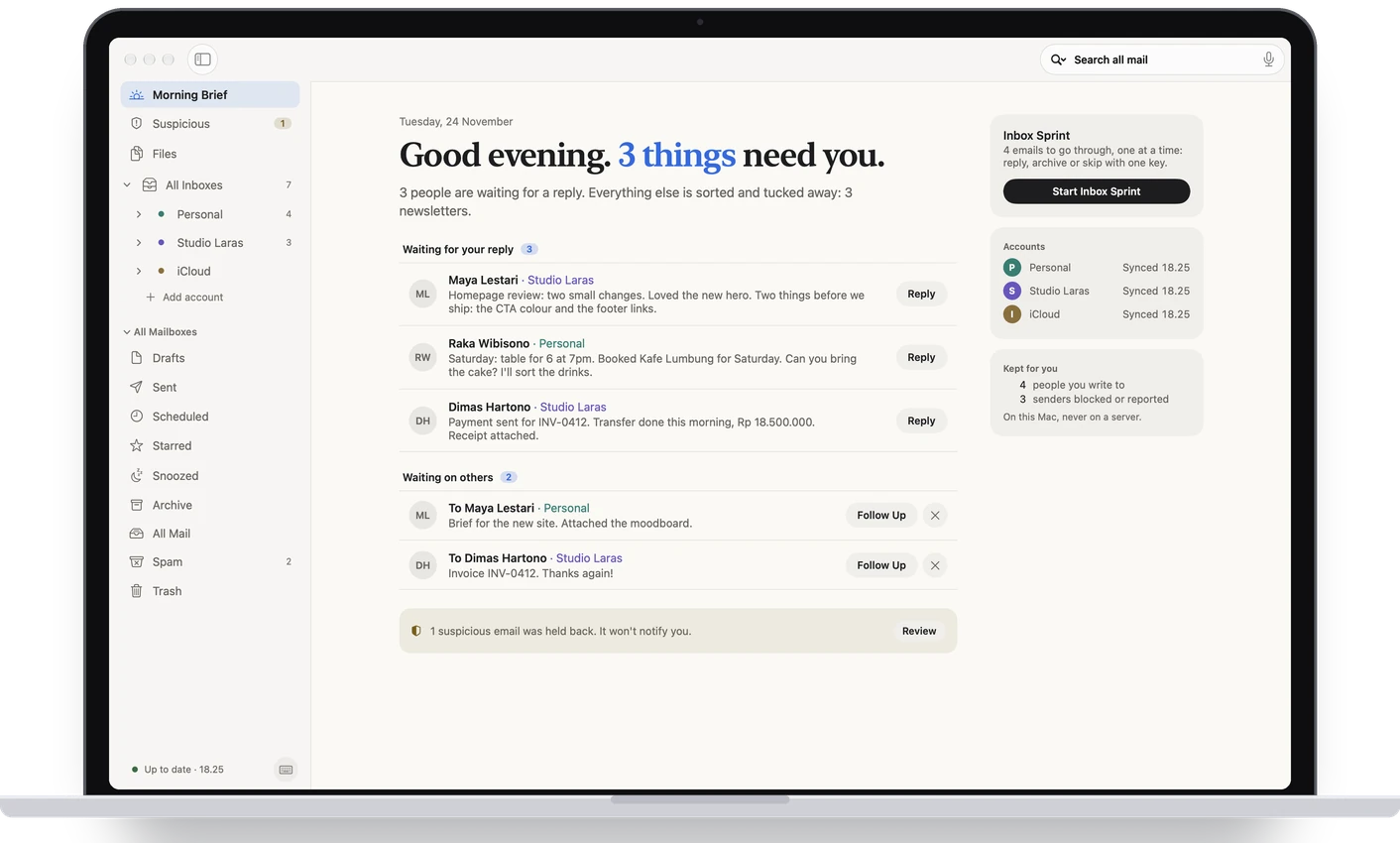
We built MailMind, so weigh this section with that in mind. We'll be plain about the money: MailMind is free, and there is an optional MailMind Pro. Pro costs $4.99 a month, $29.99 a year, or $89.99 once for life. If you dislike subscriptions, the one-time option is there on purpose.
Pro adds Inbox Sprint, Bills and receipts, Send Later, AI writing (Rewrite and suggested replies), more Smart Folders and Inbox Tabs, and instant push on iPhone. Everything else stays free, including:
- Every account you add: Gmail with real labels, iCloud, Yahoo and any IMAP account, including your own domain. Outlook is coming soon.
- Search across all of them, with Search Tips for every operator.
- Scam Shield, which explains suspicious mail in plain words.
- Blocking remote images and tracking pixels until you trust the sender.
- Blocking senders, unsubscribing and snoozing.
- Exporting a mailbox as mbox or single emails as .eml.
There is no MailMind server reading your mail, which is one reason the free version can stay free: we don't pay to run your inbox. Your sign-ins stay in the Apple Keychain. On a Mac, iPhone or iPad with Apple Intelligence, summaries and suggested replies come from Apple's on-device model. On iPhone you turn them on in Settings; they're off by default.
Honest limits: MailMind isn't on the App Store yet, and there are no shared team inboxes.
So which one should you pick?
- Free and already installed: Apple Mail.
- Free, open source, lots of add-ons: Thunderbird.
- Pay once for a full desktop suite with calendar: eM Client.
- Gmail only, Mac only, happy to subscribe: Mimestream.
- Several accounts on Mac and iPhone, free, with a pay-once upgrade: MailMind.
Still deciding? Our Gmail app for Mac comparison covers privacy and account support, and switching from Apple Mail covers what moves over.
Frequently asked questions
Is there a good free email app for Mac?
Yes. Apple Mail is free and built in, Thunderbird is free and open source, and Outlook for Mac is free with ads. Spark and eM Client also have free plans with limits.
Which Mac email apps can I buy once?
As of November 2026, eM Client sells a one-time personal license for $49.95 that covers the current major version. MailMind offers a one-time Pro purchase for $89.99 on top of its free core.
Is Airmail still a one-time purchase?
No. Airmail's extra features are sold as Airmail Pro, a subscription listed at $49.99 a year on its help center as of November 2026.
What does MailMind Pro add?
Inbox Sprint, Bills and receipts, Send Later, AI writing (Rewrite and suggested replies), more Smart Folders and Inbox Tabs, and instant push on iPhone. Everything else is free.
A calm, private mail app for Mac, iPhone and iPad. Your mail stays on your devices, and the AI runs on them too. See what it does.
Get MailMind