MailMind vs Superhuman: a cheaper alternative
Superhuman is built for speed: keyboard shortcuts for everything, a split inbox and cloud AI, for about $30 a month. MailMind gives you one key per action, a sorted inbox and AI on the device, free or $29.99 a year for Pro. Superhuman suits teams on Gmail or Outlook who want its coaching and Windows and Android apps; MailMind suits one person on Apple devices who wants the speed without the price or the cloud.
How do Superhuman and MailMind compare?
| Superhuman | MailMind | |
|---|---|---|
| Price (as of November 2026) | From about $30 a month per user ($25 billed yearly), no free plan | Free; Pro $29.99 a year, $4.99 a month or $89.99 once |
| Cost for one year | About $300 to $360 | $0, or $29.99 |
| Accounts | Gmail and Outlook | Gmail, iCloud, Yahoo, any IMAP; Outlook (coming soon) |
| Keyboard | Shortcuts for everything, command palette | One key per action: E archive, # delete, J and K to move; Gmail's own shortcuts on Mac |
| AI | Cloud AI writing and summaries | Apple's on-device model |
| Where your mail goes | Superhuman's service | Only your provider and your devices |
Prices are from Superhuman's Mail plans page in November 2026: Starter is $25 a month per user billed yearly (about $30 monthly) and Business is $33 billed yearly. Check there for today's figure.
Is Superhuman worth $30 a month?
For some people, yes. If email is most of your job, a personal onboarding session and a fast, opinionated workflow can pay for themselves. For most people who just get too much mail, $300 or more a year is a lot to pay for speed you can get elsewhere.
Can MailMind be as fast?
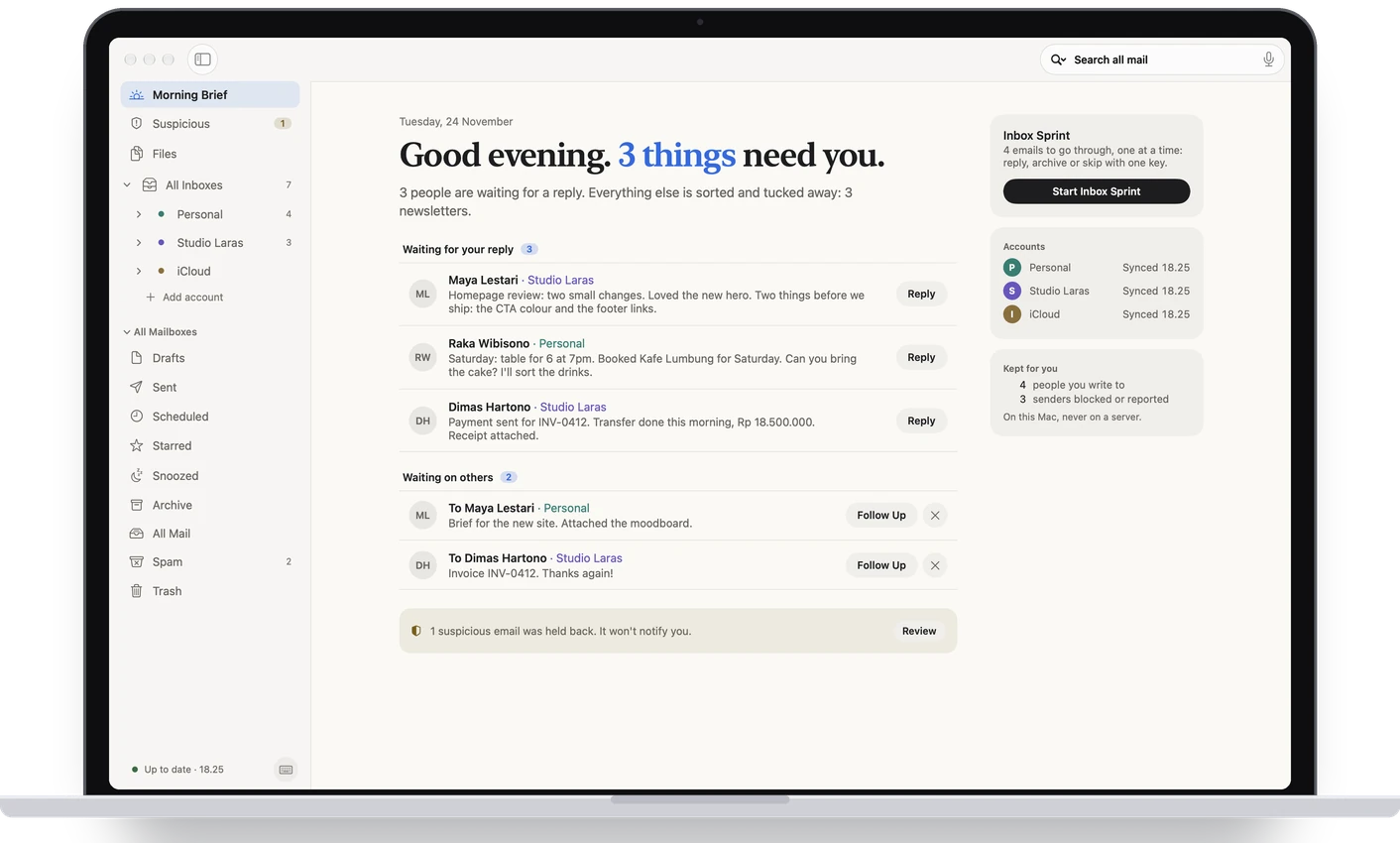
For clearing an inbox, very close. Every common action is a single key with no modifier: E archives, # deletes, U marks read, S stars, J and K move, and the next email opens by itself, so 40 emails take 40 key presses. Inbox Sprint (Pro on Mac) shows one email at a time so you can clear the pile without looking at the list. ⌘1 to ⌘9 jump between inboxes, and search is instant across all accounts. If your fingers know Gmail's shortcuts, the Mac app can switch to them, two-key ones like G then I included. Type / and a shortcut, like /thanks, to drop in a template.
What about AI?
Superhuman's AI writes and summarizes using cloud models. MailMind's Morning Brief, thread summaries and suggested replies come from Apple's on-device model, so nothing is sent to a cloud AI, and they run only when you ask. The on-device model is smaller, so it's best at summaries and short replies, not long drafts.
Where is Superhuman the better choice?
- Your team already uses it and shares its workflows.
- You need Windows or Android. MailMind is Mac, iPhone and iPad only.
- You want long emails drafted by a large cloud model.
Where is MailMind the better choice?
- You pay for yourself and want the speed for $29.99 a year, or $89.99 once.
- You have iCloud, Yahoo or IMAP accounts as well as Gmail.
- You want your mail and AI on your own devices. See our privacy page.
- You get scam mail. MailMind flags it with the reason, for free.
Honest limits: MailMind isn't on the App Store yet, has no team features, and its AI needs Apple Intelligence turned on. More options in every Gmail app for Mac compared.
Frequently asked questions
How much does Superhuman cost in 2026?
Superhuman Mail's Starter plan is $25 a month per user billed yearly, about $30 billed monthly. Business is $33 a month billed yearly, Enterprise is priced on request, and there is no free plan. Check superhuman.com/plans/mail for today's price.
Is there a cheaper alternative to Superhuman?
Yes. MailMind has one-key shortcuts and a sorted inbox for free, with Pro at $29.99 a year or $89.99 once. Mimestream ($49.99 a year) and Apple Mail (free) are other options on Mac.
Does MailMind work with Outlook accounts?
Not yet: Outlook is coming soon. Today MailMind works with Gmail, iCloud, Yahoo and any IMAP account.
Does MailMind send my email to an AI service?
No. Summaries and suggested replies are written by Apple's on-device model. Nothing is sent to a cloud AI.
A calm, private mail app for Mac, iPhone and iPad. Your mail stays on your devices, and the AI runs on them too. See what it does.
Get MailMind