Gmail app for Mac: every option compared
Google doesn't make a Gmail app for Mac, so you have four real choices: Gmail in a browser tab or web app, Apple Mail, a dedicated Gmail client such as Mimestream, or a multi-account app such as Spark, Outlook or MailMind. The right one depends on how many accounts you run, whether you need an iPhone app too, and how much you care about where your mail and sign-in are kept.
Is there an official Gmail app for Mac?
No. Google offers Gmail on the web and as apps for iPhone, iPad and Android, but not for macOS. Every "Gmail app for Mac" is either the website in a window or a third-party mail app that connects to your Google account.
That's why the question keeps coming up. The website works, but it lives in a browser full of other tabs, notifications depend on which browser profile is signed in, and switching between a personal and a work account means switching tabs or profiles.
What are the options, side by side?
| Option | Several accounts | iPhone app | Gmail labels | Where your mail goes | Price (Nov 2026) |
|---|---|---|---|---|---|
| Gmail in the browser or as a web app | One per tab or profile | Google's Gmail app | Native | Google only | Free |
| Apple Mail | Yes, unified inbox | Yes | Shown as folders | Google and your devices | Free |
| Mimestream | Gmail accounts only | In beta | Native | Google and your Mac | $49.99 a year |
| Spark | Yes, any provider | Yes | Supported | Also Spark's servers, per its privacy page | Free plan, paid tiers |
| Outlook for Mac | Yes | Yes | As folders and categories | Also Microsoft's cloud, per Microsoft | Free, more with Microsoft 365 |
| MailMind | Yes, any provider | Yes, plus iPad | Native | Google and your devices | Free, optional Pro |
"Where your mail goes" matters more than it looks. Some apps keep a copy of your sign-in on their own servers so they can check mail for you in the background. That makes push notifications easy, but it means a company other than Google can reach your inbox.
When is the browser good enough?
If you have one Gmail account, use Gmail's own features (like its tabs and filters), and keep your browser open all day anyway, the web is fine. In Safari you can choose File › Add to Dock to turn Gmail into its own window with a Dock icon, and Chrome can install it as an app. It costs nothing and every Gmail feature is there first.
It starts to hurt with two or more accounts, when notifications go missing, or when you want to read mail offline.
Why not just use Apple Mail?
Apple Mail is free, fast and already on your Mac and iPhone. For many people it's the right answer. The friction is that Gmail isn't really built on folders. Gmail uses labels, and Apple Mail shows each label as a folder, so one message can appear in several places. Archive and Sent need a couple of settings to behave the way Gmail does. We wrote a step-by-step fix for Apple Mail with Gmail if you'd like to stay.
On iPhone, Apple Mail can only check Gmail on a schedule, so new mail can arrive late.
Who is Mimestream for?
Mimestream is a well-made Mac app built only for Gmail, and it talks to Gmail through Google's own API, so labels, categories and filters feel native. If you only use Gmail, only on a Mac, and don't mind a subscription, it's a strong choice. It doesn't handle iCloud, Outlook or other providers, and its iPhone app is still in beta.
Spark and Outlook: features, with a trade-off
Spark has a polished design, a smart inbox and team features, on every platform. Outlook is the default in many workplaces. Both offer a lot. Both also involve their own cloud: Spark explains in its privacy page how it keeps account access on its servers to deliver features like push, and new Outlook for Mac syncs Google accounts through the Microsoft Cloud. If that's acceptable to you, either works well.
Where MailMind fits
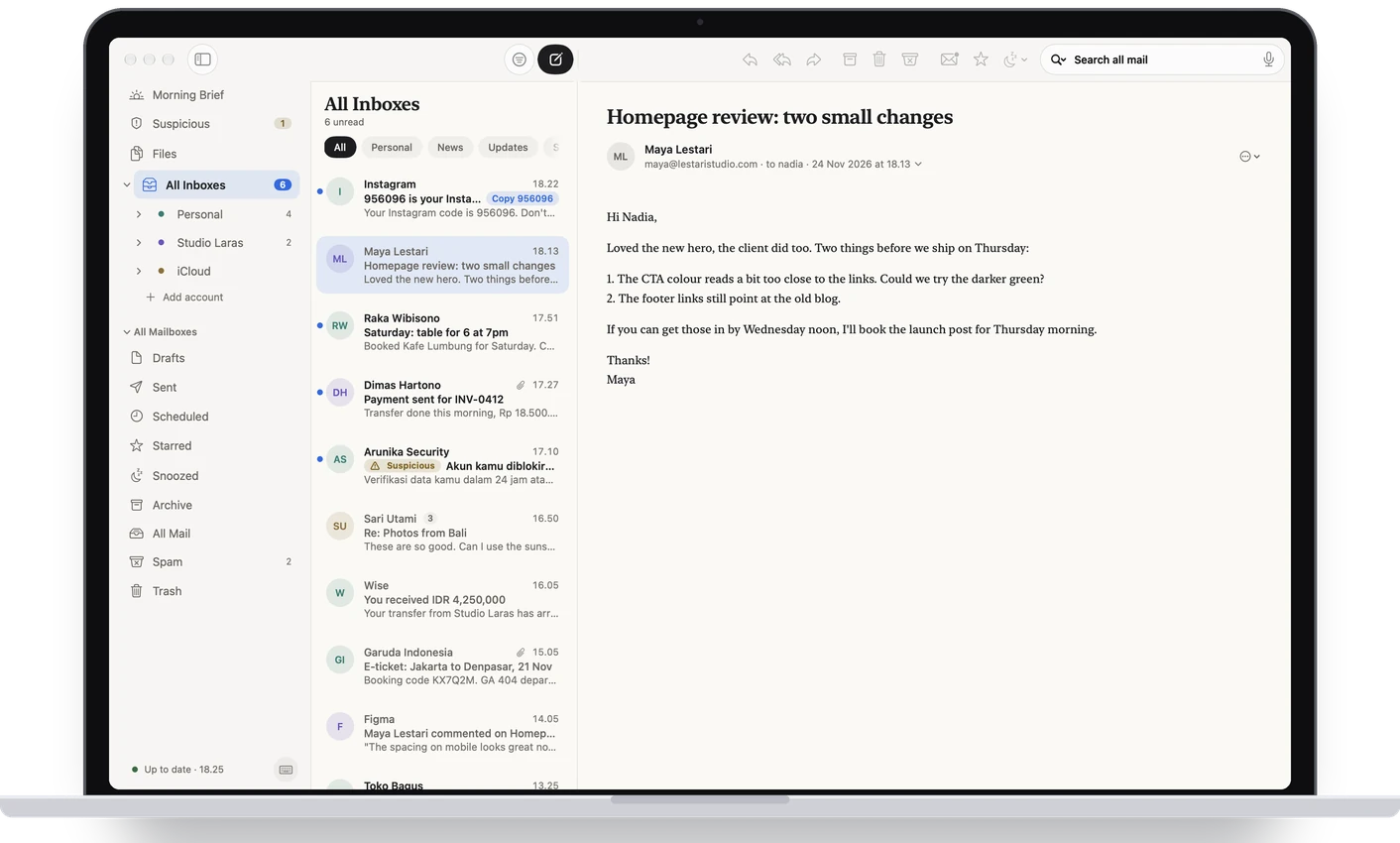
We built MailMind for people who run several Gmail accounts at once (personal, work, a side business) and want all of them in one calm app on Mac, iPhone and iPad. It connects straight from your device to Google, with real Gmail labels. Your mail and sign-in stay on your devices, and summaries and suggested replies are written by Apple's on-device model, so nothing is sent to a cloud AI. Profiles group your accounts (work and home, say) and switch the inbox, counts and notifications together. Your Gmail filters show in plain words and can be added, changed or deleted in MailMind, and they keep working in Gmail on the web.
It also flags suspicious mail with a plain reason (a look-alike domain, a failed sender check, a risky attachment) and blocks tracking pixels until you trust the sender. It also handles iCloud, Yahoo and any IMAP account, and Outlook is coming soon.
Honest limits: MailMind isn't on the App Store yet, the AI features need a device with Apple Intelligence turned on, and it has no shared team inboxes. If you need those, Spark or Outlook is a better fit.
So which should you pick?
- One Gmail account, always in a browser: Gmail on the web, added to your Dock.
- Free and built in, happy to tweak settings: Apple Mail.
- Gmail only, Mac only, pay for polish: Mimestream.
- Team features across every platform: Spark or Outlook.
- Several accounts, Mac and iPhone, mail kept on your own devices: MailMind.
If you juggle accounts today, our guide to managing several Gmail accounts on a Mac walks through each setup.
Frequently asked questions
Does Google make a Gmail app for Mac?
No. Google offers Gmail on the web and as apps for iPhone, iPad and Android only. On a Mac you use the website, install it as a web app, or use a mail app that connects to your Google account.
Is it safe to use a third-party Gmail app?
It depends on where the app keeps your sign-in. Apps that connect straight from your device to Google, and store your sign-in in the Apple Keychain, keep your mail between you and Google. Apps that store access on their own servers can reach your inbox too; check each app's privacy page.
Can I use Gmail labels in Apple Mail?
Yes, but they appear as folders, so a message with three labels shows up in three places. Archiving needs the archive mailbox set to All Mail to match Gmail.
What's the best Gmail app for Mac and iPhone together?
Apple Mail, Spark, Outlook and MailMind all have Mac and iPhone apps. Mimestream is Mac only for now, with an iPhone beta.
A calm, private mail app for Mac, iPhone and iPad. Your mail stays on your devices, and the AI runs on them too. See what it does.
Get MailMind