The private Gmail app for Mac
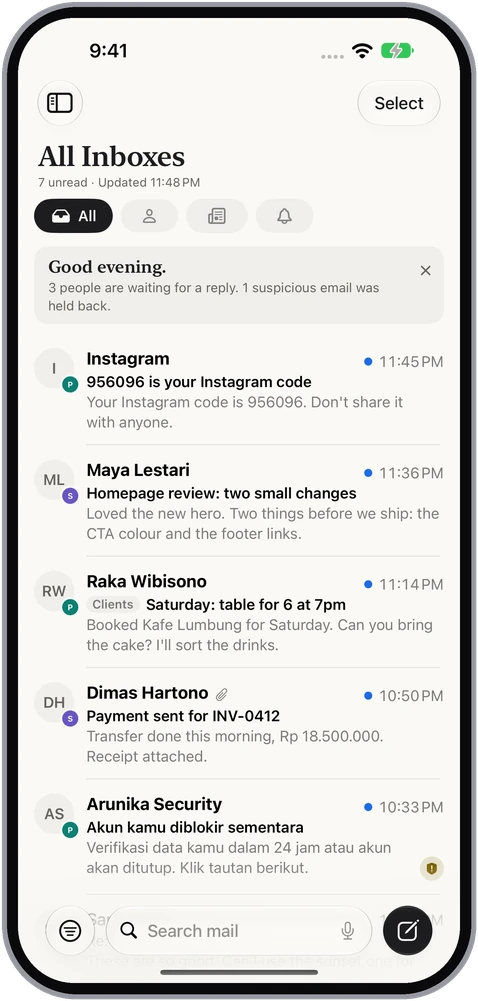
Gmail, iCloud, Yahoo and your own domain in one inbox on Mac, iPhone and iPad, with Outlook coming soon. MailMind puts the people waiting on you first, warns you about a fake bank email before you click it, and keeps every message on your own devices.
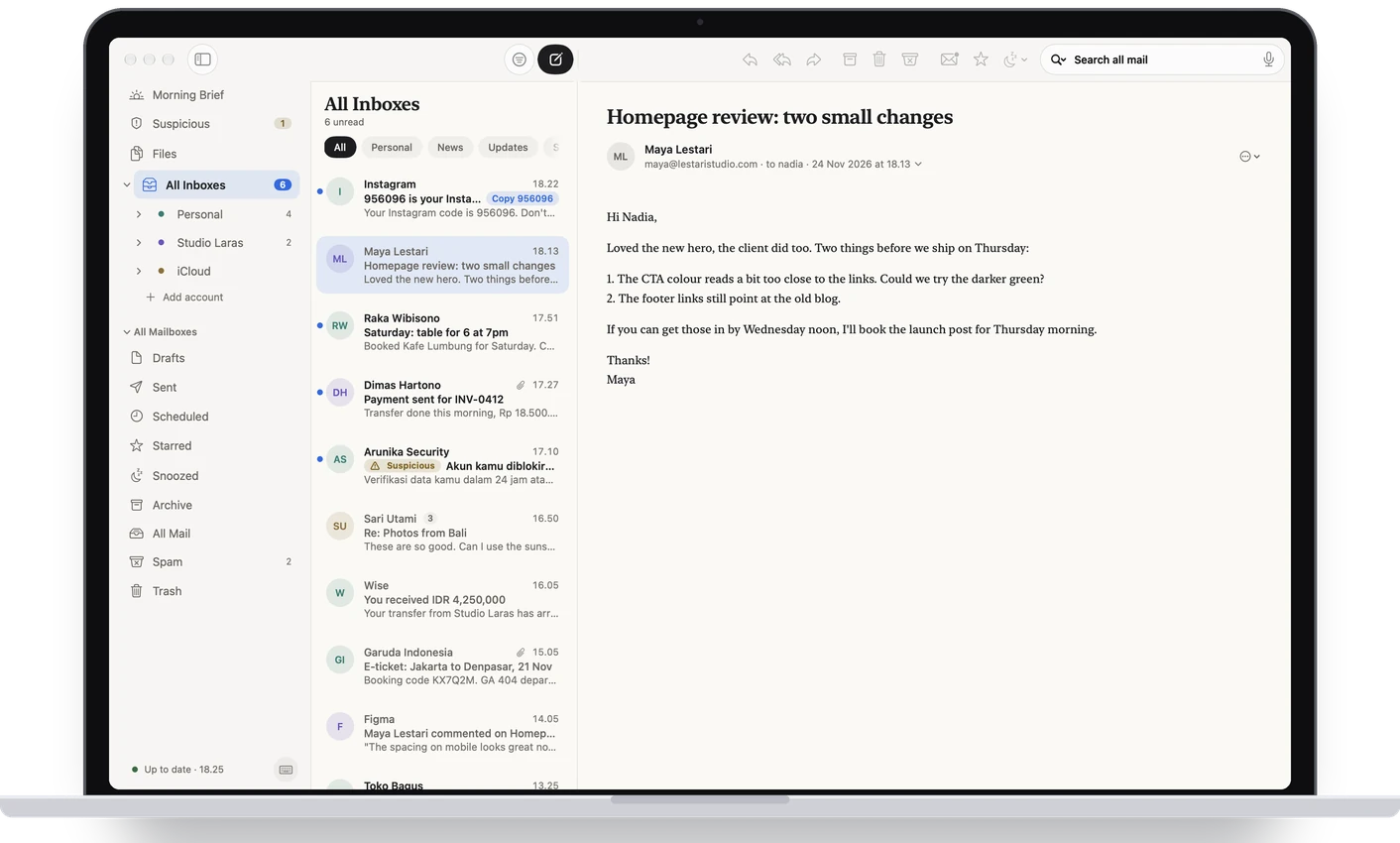
- Gmail
- Google Workspace
- iCloud
- Yahoo
- Any IMAP server
- Outlook soon
See it in 45 seconds
Why people leave the Gmail tab and Apple Mail
- Gmail lives in a browser tab you keep losing.
- MailMind is a real app for Mac, iPhone and iPad, with every account in one window and notifications that arrive.
- Apple Mail turns Gmail labels into folders and duplicates.
- MailMind speaks Gmail’s own language: real labels, an Archive that archives, and no copies piling up in All Mail.
- Every good mail app wants another subscription.
- The mail app is free. Pro is optional, and you can buy it once instead of renting it.
- “Smart” features send your mail to someone’s server.
- No MailMind server reads your mail, and the AI runs on your own device.
What changes when you switch
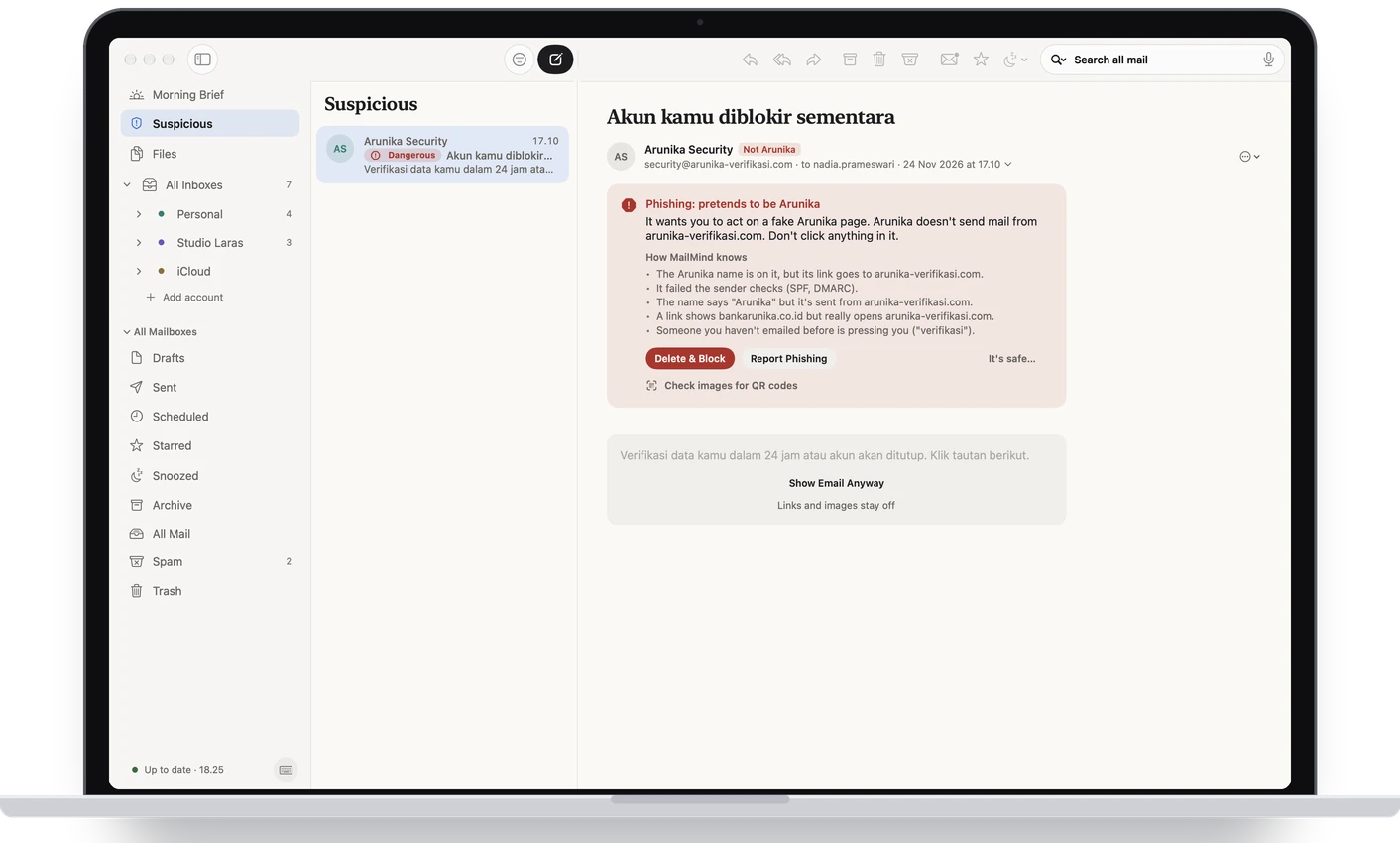
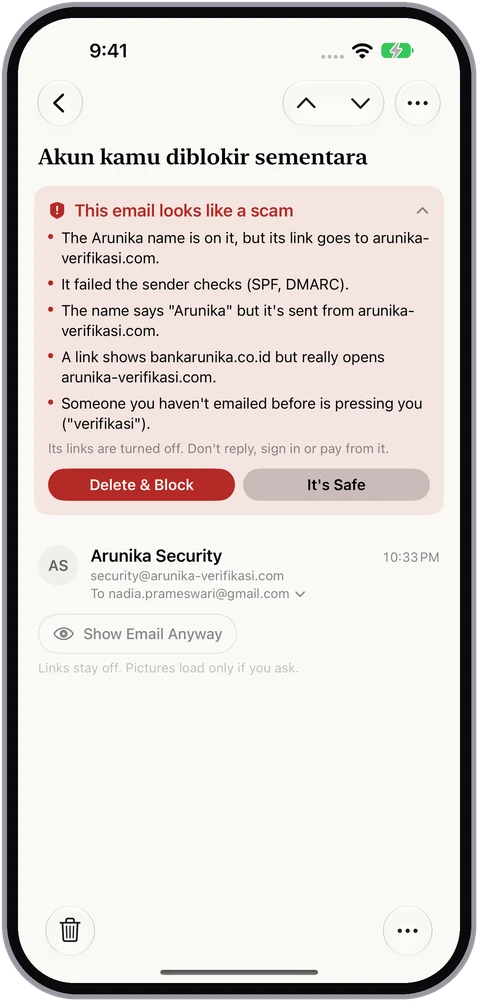
Spot the fake bank email before you click
When a message says it’s from your bank but its link goes to a look-alike site, MailMind tells you, in plain words. Spoofed senders, failed SPF, DKIM or DMARC checks and risky attachments get the same warning. Links show where they really go, and the email stays behind a veil until you choose to open it.
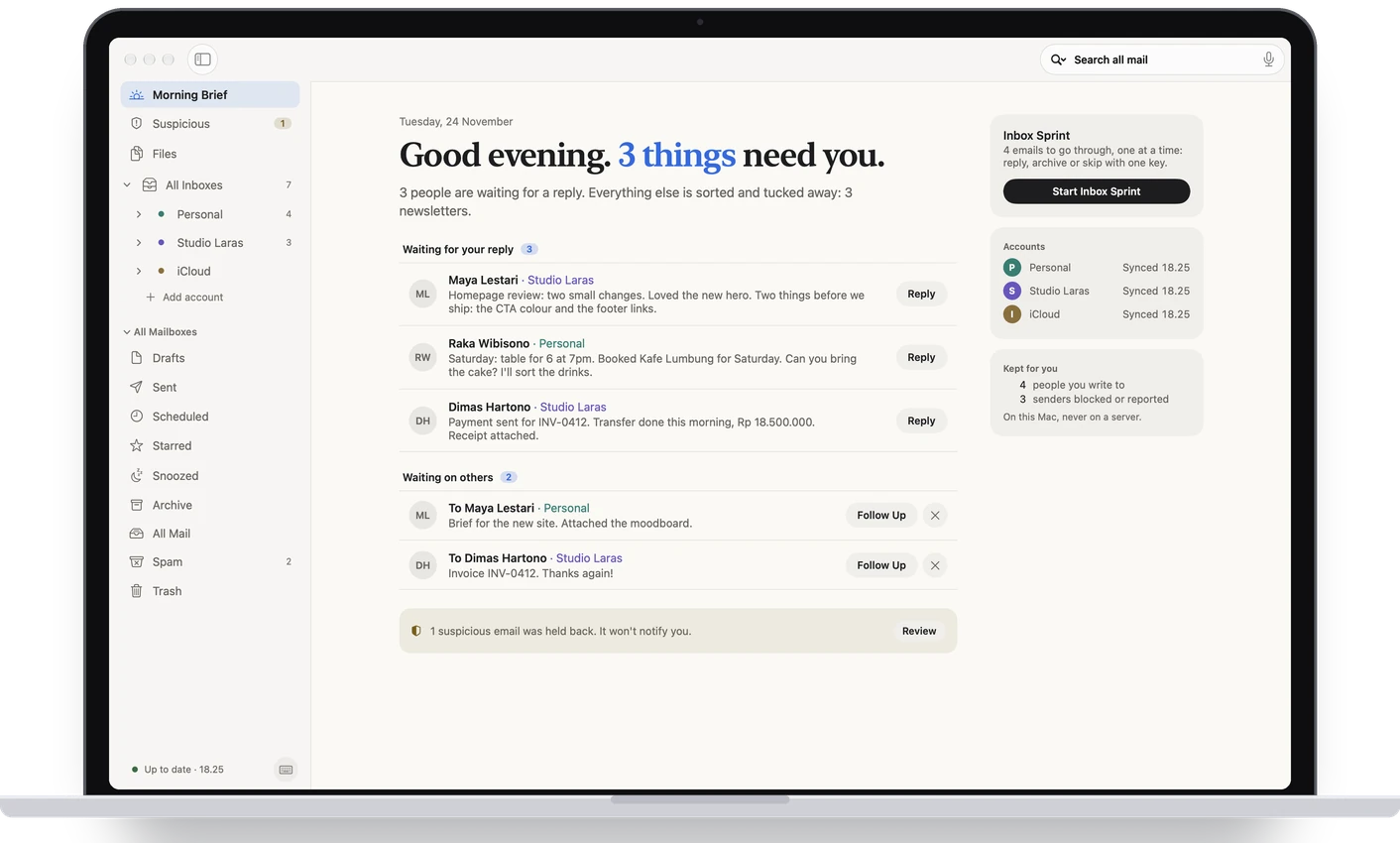
A morning brief, not a pile
One short note says who is waiting for a reply and which bills are due. Personal, News and Updates tabs keep real conversations on top, and the Screener holds first-time senders until you let them in.
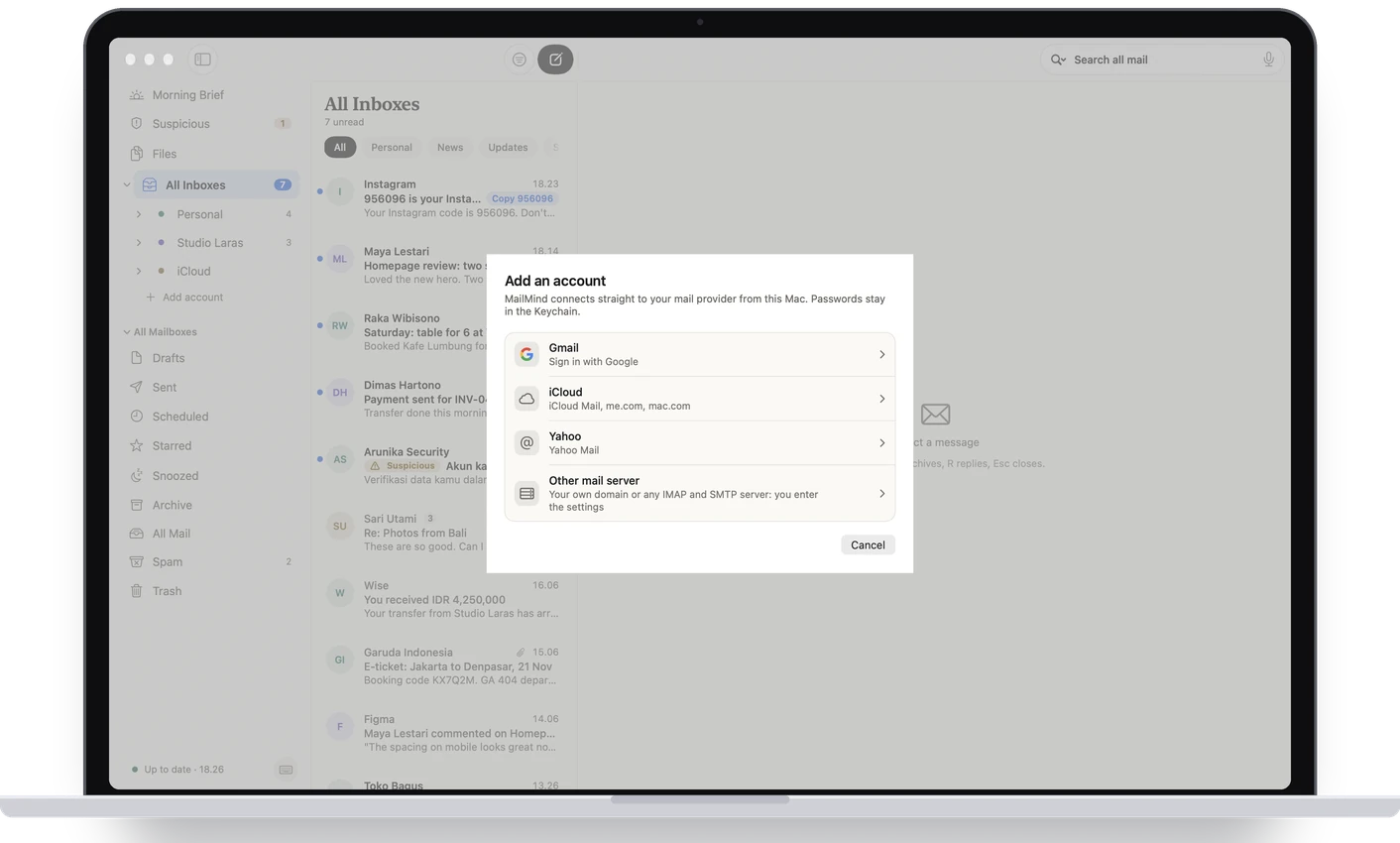
Every account in one inbox
Gmail with its real labels, iCloud, Yahoo, any IMAP server on your own domain, and soon Outlook. Each gets its own colour and the right From address when you reply. Look at all of them together, or one at a time.
- No tracking pixels
- Remote images stay blocked until you trust the sender, so nobody learns when you opened their mail. Nothing is added to the mail you send.
- AI on your device
- Summaries, suggested replies and rewrites run on Apple's on-device model, on Mac, iPhone and iPad. Your mail is not sent to an AI company.
- Built for the keyboard
- J and K to move, E to archive, ⌘1 to ⌘9 to switch inboxes, instant search, and Inbox Sprint to clear mail one at a time. On the Mac you can use Gmail’s own shortcuts instead.
- Snooze, send later, follow up
- Undo send, schedule mail, snooze what can wait, type /thanks to drop in a saved template, and get a reminder when someone doesn't reply.
- Bills and receipts
- Picked out of your mail and totalled, so nothing due slips past.
- Attachments when you want them
- Never downloaded in the background. Risky files ask first. When you send, anything over Gmail’s limit goes as a Google Drive or share link, and photos shrink to the size you pick.
- Works with your AI assistant
- On the Mac, Claude or any app that supports MCP can search the accounts you pick and propose drafts for you to review. It can never send or delete, and it's off until you turn it on.
- One-click cleanup
- Unsubscribe, block a sender or report phishing in one click. These stay free, always.
- Locked when you want
- Face ID, Touch ID or your device password. Moving from Apple Mail? Import your mail on the Mac.
- Profiles for work and home
- Group your accounts and switch between them. The inbox, counts and notifications follow, and a Focus can switch for you.
- Your Gmail filters, here
- See each filter in plain words, then add, change or delete it. They keep working in Gmail on the web.
- Done from the notification
- Archive, mark read or trash new mail without opening it. A widget on iPhone and iPad counts new mail, never who wrote.
The same inbox in your pocket
The same calm inbox and the same scam warnings, built for touch. Swipe through your mail with one thumb. On iPad, replies open next to the email and any draft can move into its own window.
The AI came along too. Summarize a long thread or get suggested replies right under the subject, and the sparkle button rewrites or translates your draft, with Undo. It all runs on the iPhone or iPad itself, and stays off until you turn it on in Settings.
New mail is checked in the background for everyone. With MailMind Pro, Gmail arrives on your iPhone instantly through a push relay that never sees your mail.
Your mail never passes through us
MailMind talks directly to your mail provider from your device, stores your mail in the app's own storage, and keeps your sign-ins in the Apple Keychain. No MailMind server ever reads your mail, and you don't need an account with us. The one service we run is a relay that wakes your iPhone when new mail arrives (MailMind Pro), and it never sees your mail. The app has no analytics, no ads and no tracking pixels. Read the privacy policy.
Pricing
Every account, every scam warning and every tracker block is free, for good. Pro adds power features, and you can buy it once instead of renting it.
Free
$0forever
Everything you need for calm, safe mail.
- Every account and the unified inbox
- Scam warnings, tracker blocking and app lock
- Thread summaries on the device
- Screener, tabs, Morning Brief and instant search
- Snooze, undo send and follow-up reminders
- Unsubscribe, block sender and report phishing
- 3 Smart Folders and 2 custom Inbox Tabs
MailMind Pro
$29.99/year
Starts with a 14-day free trial. About $2.50 a month.
- Instant Gmail push on iPhone
- Send Later
- AI writing: suggested replies and rewrite
- Inbox Sprint and Bills & receipts on Mac
- Unlimited Smart Folders and Inbox Tabs
- One purchase covers Mac, iPhone and iPad, with Family Sharing
Pro is $4.99 a month, $29.99 a year or $89.99 once. Prices in US dollars; the App Store shows the price for your country. If Pro ends, nothing you made is removed and scheduled mail still goes out.
Questions
When is MailMind available?
MailMind is in final testing and coming soon to the App Store for Mac, iPhone and iPad. Follow the blog or its RSS feed to hear when it's out.
What do I need to run it?
macOS 26 on a Mac, or iOS 26 and iPadOS 26 on iPhone and iPad. The AI features need Apple Intelligence turned on, on a device that supports it; without it they are simply hidden. On iPhone and iPad they stay off until you turn them on in MailMind’s Settings.
Which mail accounts work?
Gmail and Google Workspace (with real labels), iCloud, Yahoo, and any IMAP/SMTP server, including your own domain. Outlook is coming soon.
Does MailMind read or store my mail on a server?
No. Your mail goes straight between your device and your provider. See Private by design and the privacy policy.
Does one Pro purchase cover all my devices?
Yes. Mac, iPhone and iPad are one App Store app, so Pro unlocks everywhere you use the same Apple Account, and Family Sharing is supported.
Can I use MailMind with Claude or another AI assistant?
Yes, on the Mac. Turn on agent access in MailMind’s Settings, tick the accounts to share, and Claude Code, Claude Desktop or any other app that supports MCP can search that mail and propose drafts. An agent can never send, delete or download anything, never sees sign-in codes or password resets, and every draft waits for you to review. It’s off until you switch it on.
Which languages does it speak?
English and Bahasa Indonesia. MailMind follows your device language. On the Mac you can switch it on the first screen or in Settings; on iPhone and iPad, in the Settings app under MailMind.
Get MailMind the day it lands.
MailMind lands on the App Store soon for Mac, iPhone and iPad. Leave your email and you’ll get one message the day it’s out. It’s free to download, with every account and every safety feature included.
Support
Questions or problems? Email hello@ninetosix.id. We usually reply within two working days. Guides and comparisons are on the blog.