Fix Apple Mail with Gmail: archive, labels and duplicates
Apple Mail treats Gmail labels as folders, which is why messages appear twice and Archive sends mail somewhere unexpected. Fix it in three places: hide labels you don't need from IMAP in Gmail's settings, tell Apple Mail that Gmail's All Mail is your Archive and that Sent Mail is your Sent folder, and on iPhone set discarded messages to go to the archive.
Why does Gmail behave strangely in Apple Mail?
Gmail doesn't store mail in folders. Every message lives once in All Mail, and labels like Inbox, Work or Receipts are tags on it. Apple Mail talks to Gmail over IMAP, a standard built around folders, so Gmail shows each label as a separate folder. A message with three labels looks like three messages, and "archive" has no obvious folder to go to.
None of this is a bug in your account. It's two different ideas of what a mailbox is, and a few settings line them up.
Step 1: Choose which labels Apple Mail sees
- Open Gmail in a browser and click the gear icon, then See all settings.
- Open the Labels tab.
- In the Show in IMAP column, untick labels you don't need on your Mac. Important and Starred are the usual sources of duplicates. Keep Inbox, Sent Mail, Trash, Spam and All Mail ticked.
Fewer labels in IMAP means fewer copies in Apple Mail, a faster sync and less disk space.
Step 2: Check how Gmail handles deleted mail
- In the same settings, open Forwarding and POP/IMAP.
- Under IMAP access, leave Auto-Expunge on.
- For "When a message is marked as deleted and expunged from the last visible IMAP folder", choose Archive the message if you want deleting in Apple Mail to behave like archiving, or Move the message to the Trash if you want it gone.
- Click Save Changes.
Step 3: Point Apple Mail's Archive and Sent at the right folders
- In Apple Mail's sidebar, expand your Gmail account (you may need to scroll down to the account's own section, below Favorites).
- Select All Mail, then choose Mailbox › Use This Mailbox For › Archive.
- Select Sent Mail and choose Mailbox › Use This Mailbox For › Sent.
- Do the same for Trash (Trash) and Spam (Junk).
Now the Archive button removes the Inbox label and leaves the message in All Mail, exactly like Gmail's own Archive, and sent mail stops being saved twice.
Step 4: Do the same on iPhone and iPad
Go to Settings › Apps › Mail › Mail Accounts, tap your Gmail account, then Account › Advanced. Set Move Discarded Messages Into to Archive Mailbox, and under Mailbox Behaviors set the Archive mailbox to All Mail. Swiping a Gmail message will then archive it instead of deleting it.
One thing settings can't fix: Apple Mail on iPhone checks Gmail on a schedule rather than getting it pushed, so new mail can arrive minutes late. Shorten the interval under Settings › Apps › Mail › Mail Accounts › Fetch New Data, at some cost to battery.
Still seeing problems after a macOS update?
After major macOS updates some people find Archive or Sent pointing back at the wrong folder. Repeat Step 3, then select the account and choose Mailbox › Synchronize. If the account still misbehaves, remove it in System Settings › Internet Accounts and add it again; your mail stays safe in Gmail and downloads again.
Or use an app that speaks Gmail natively
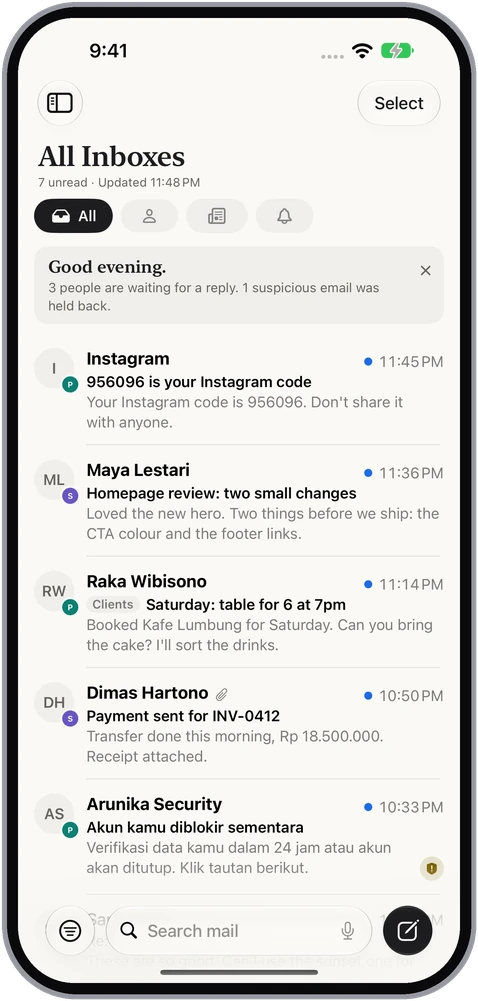
Apps that use Google's Gmail API instead of IMAP understand labels as labels, so there's nothing to configure. MailMind works this way for Gmail: Archive does what Gmail's Archive does, a message with three labels is still one message, and your labels show up as labels on Mac, iPhone and iPad. They sit before the subject in the list, as in Gmail, and you can rename or delete a label from the sidebar while your emails stay where they are. On iPhone, each inbox in Mailboxes opens to show its own labels, each with its unread count. It also keeps your other accounts (iCloud, Yahoo or your own domain) in the same inbox.
If you're weighing up apps, see every Gmail app for Mac, compared, or our guide to managing several Gmail accounts.
Frequently asked questions
Why do I see duplicate emails from Gmail in Apple Mail?
Gmail shows every label as a folder over IMAP, so a message with several labels appears once per label. Untick Show in IMAP for labels like Important in Gmail's Labels settings.
Where do archived Gmail messages go in Apple Mail?
Into All Mail, once you set All Mail as the Archive mailbox with Mailbox › Use This Mailbox For › Archive. The message simply loses its Inbox label, as in Gmail.
Should I hide All Mail from IMAP?
Usually not. If you hide it, archived messages disappear from Apple Mail and search can't find them. Hide Important and Starred instead.
Why are my Gmail emails late on iPhone Mail?
Apple Mail fetches Gmail on a schedule rather than receiving push. Shorten the interval in Settings › Apps › Mail › Mail Accounts › Fetch New Data, or use an app that gets push notifications.
A calm, private mail app for Mac, iPhone and iPad. Your mail stays on your devices, and the AI runs on them too. See what it does.
Get MailMind