The best Notion Mail alternatives after the shutdown (2026)
Notion Mail shut down on 22 September 2026. Your email is safe: it was always in your Gmail account, and Notion Mail was an app on top of it. If you want what Notion Mail gave you, Shortwave and Superhuman are the closest for AI sorting, Mimestream for a focused Mac Gmail app, and Gmail itself covers the basics for free. Prices below were checked on each vendor's page on 23 November 2026.
What happened to Notion Mail?
Notion closed Notion Mail on 22 September 2026, for every plan and platform. Notion's help center has a page on it, "Notion Mail inbox is going away", and Notion consultant Matthias Frank has a plain summary of what it meant.
Why? Notion told 9to5Mac that "more than half of Notion Mail users manage emails without ever opening their inbox", and that it is going all in on AI agents that run your inbox for you, inside Notion itself.
Notion Mail was a Gmail app built around AI labels that sorted mail for you, custom views of your inbox, and snippets for replies you send often. It never held your mail itself. Gmail did.
Did you lose anything?
- Your received and sent mail: no. It is all still in Gmail. Open mail.google.com or any mail app and it is there.
- Labels: any label that reached Gmail stays on your messages there. Check your Gmail label list to see which ones did.
- Unsent drafts, scheduled sends and snippets: these lived in Notion Mail, and reports say they were not carried over. If you had a scheduled email waiting, check whether it went out, and send it again if it didn't.
- Your AI label rules and views: these were Notion Mail settings. You will rebuild them in whichever app you pick next, so it is worth writing down what they did while you still remember.
What should a replacement do?
Most people liked Notion Mail for three things. Pick an app that covers the ones you used:
- Sorting without effort: newsletters and notifications kept out of the way, real people on top.
- Views: saved slices of the inbox, like "from clients" or "unread with attachments".
- Snippets: replies you can insert in two keystrokes.
The alternatives, compared
| App | Price (23 Nov 2026) | Closest to Notion Mail's | Platforms |
|---|---|---|---|
| Gmail | Free; Gemini needs Google AI Pro | Labels, filters, templates | Web, iPhone, Android |
| Shortwave | Free plan; paid plans per seat from $30 a month | AI sorting and AI search | Web and mobile |
| Superhuman | Pro $15 a month, Business $40 | AI triage, speed, snippets | Web, Mac, iPhone |
| Mimestream | $4.99 a month or $49.99 a year | Real Gmail labels, filters, templates | Mac (iPhone in beta) |
| Spark | Free plan; Plus $99 a year | Smart Inbox sorting | Mac, iPhone, Android, Windows |
| MailMind | Free; Pro $29.99 a year or $89.99 once | Sorting, Smart Folders, Inbox Tabs, templates | Mac, iPhone, iPad |
Gmail is the free baseline. Filters can label and skip the inbox for you, and its own templates (Settings › Writing) do the job of snippets. It won't sort with AI unless you pay for Gemini.
Shortwave is the closest in spirit: an AI-first Gmail client that sorts and summarizes. Its paid plans are aimed at teams. See Shortwave pricing.
Superhuman is built for speed and AI triage, with snippets and keyboard shortcuts everywhere. It is the most expensive here. See Superhuman plans.
Mimestream is a polished Gmail-only Mac app that uses real Gmail labels and filters, with a 14-day trial and no card. See Mimestream pricing.
Spark has a real free plan and a Smart Inbox that groups newsletters and notifications. Reviewers in 2026 report that blocking senders needs a paid plan. See Spark pricing.
Where does MailMind fit?
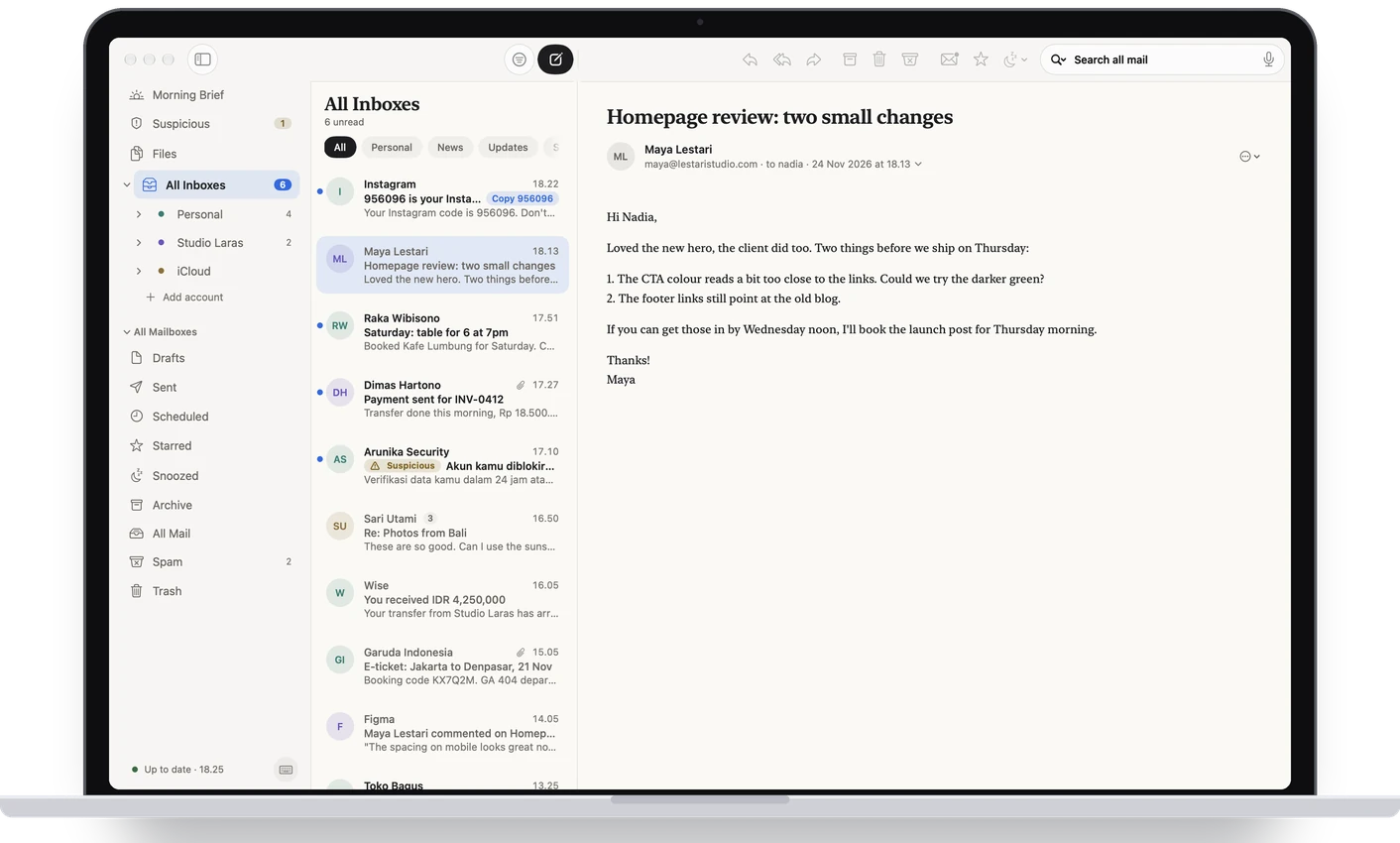
We make MailMind, so weigh this section with that in mind. Here is how it maps to what you used in Notion Mail:
- Sorting: the inbox splits into Personal, News and Updates on its own, and the Screener holds first-time senders until you let them in. It runs on your device, with no account rules to write.
- Views: Smart Folders are saved searches, and Inbox Tabs put your own views next to the built-in ones. Free includes 3 Smart Folders and 2 Inbox Tabs; Pro removes the limit.
- Snippets: templates. Type
/or;and a shortcut, like/thanks, the way snippets went in on Notion Mail, and the template drops in with the recipient's first name and yours filled in. Paste your old snippets in as they are:{{Name}}fills with the recipient's name, and a blank like{{Topic}}stays highlighted, and MailMind asks before an email goes out with one left. A template can keep its formatting, set the subject, add To, Cc and Bcc, and attach files, and your list follows you between Mac and iPhone through iCloud. - AI: on a Mac, iPhone or iPad with Apple Intelligence, summaries and suggested replies come from Apple's on-device model, so your mail isn't sent to an AI company. If you used Notion AI with your mail, MailMind on the Mac can also let Claude or another MCP app search the accounts you pick and propose drafts. It can never send or delete, and it's off until you turn it on.
- More than Gmail: iCloud, Yahoo and any IMAP account sit in the same inbox.
Honest limits: MailMind isn't on the App Store yet, the AI features need Apple Intelligence on a Mac, iPhone or iPad, it has no shared team inboxes, and it doesn't connect to Notion pages.
So which one should you pick?
- You want AI to do the sorting and don't mind the cloud: Shortwave or Superhuman.
- Gmail only, on a Mac, with real labels: Mimestream.
- Free, and you'll set up filters once: Gmail.
- Several accounts on Mac and iPhone, sorted on your device, free with an optional upgrade: MailMind.
Moving from Gmail's website instead? Our Gmail app for Mac comparison covers privacy and account support, and Gmail search operators helps you rebuild your old views as searches.
Frequently asked questions
Did I lose my email when Notion Mail shut down?
No. Notion Mail was an app on top of Gmail, so your received and sent mail is still in your Gmail account. What lived only in Notion Mail, such as unsent drafts, scheduled sends and snippets, was reported as not carried over.
What is the closest app to Notion Mail?
For AI sorting of Gmail, Shortwave and Superhuman are the closest. For a calm Mac app with views and saved searches, Mimestream or MailMind. Gmail itself, with labels and filters, covers the basics for free.
Is there a free Notion Mail alternative?
Yes. The Gmail app and website, Apple Mail and Spark's free plan cost nothing. MailMind's core, including sorting, search and Scam Shield, is free too.
Why did Notion shut down Notion Mail?
Notion said more than half of Notion Mail users managed email without opening the inbox, and that it is putting its effort into AI agents that handle email inside Notion instead.
Can I still use Notion AI with my Gmail?
Notion's Gmail connection for Notion AI is separate from Notion Mail, and reports say it kept working. Check Notion's help center for its current status.
A calm, private mail app for Mac, iPhone and iPad. Your mail stays on your devices, and the AI runs on them too. See what it does.
Get MailMind