How to tell if an email is phishing (with examples)
A phishing email wants you to act before you think: click a link, sign in, pay, or call a number. Look at the real address after the @, hover over links to see where they go, and be suspicious of any rush, any new bank details, and any request for gift cards or crypto. When in doubt, close the email and go to the company's site or app yourself.
What does a phishing email look like?
Most phishing falls into a handful of patterns. Once you know them, you'll spot them in seconds. Here are the common ones, each with a short example of the kind of thing that lands in real inboxes.
1. The fake security alert
"Unusual sign-in activity on your account. Verify your identity within 24 hours or your account will be suspended."
This one copies Google, Apple, Microsoft or your bank. The words "suspended", "unusual activity" and "verify your" do the work. Real services do send alerts, which is why the fake works. The fix is to check the alert somewhere the scammer can't reach. For Google, Gmail's help says that if a security email that looks like it's from Google might be fake, go directly to myaccount.google.com/notifications and check your recent security activity there. A real alert shows up in that list. Google also says Gmail won't ever ask for your password over email. Google explains what real alerts ask of you in Respond to security alerts.
The same rule works for Apple and your bank: open the app or type the address yourself, and look there.
2. Urgency and pressure
"Final notice. Your payment failed. Update your card today to avoid a late fee."
Deadlines, threats and countdowns are there to stop you checking. A real company gives you time. When a stranger is in a hurry for you, slow down.
3. The changed bank details invoice
"Please note our bank account has changed. Kindly send this month's invoice payment to the new account below."
This one hits businesses and freelancers. It often arrives in a real-looking thread, sometimes from a supplier whose mailbox was broken into. Never pay new account numbers that only came by email. Call the supplier on a number you already had.
4. Gift cards and crypto
"I'm in a meeting and can't talk. Can you buy five gift cards for a client and send me the codes?"
Bosses, landlords and tax offices don't ask to be paid in gift cards or crypto. Scammers do, because once it's sent, it can't be traced or pulled back.
5. The callback scam
"Thank you for your purchase. $499.99 will be charged today. If you did not make this order, call our support line."
No link, no attachment, just a phone number. Spam filters have little to catch, and the person on the phone does the stealing, often by asking you to install a "refund" app. Check the charge in your real account instead.
6. Look-alike domains
The name says "PayPal", but the address is service@paypa1-billing.com. Read the domain after the @ slowly, right to left. Watch for swapped letters (rn for m, 1 for l), extra words like "-security" or "-verify", and the brand used as the first part of someone else's domain. Our guide to checking if an email sender is real covers this, plus the SPF, DKIM and DMARC results in the headers.
7. Links that say one thing and open another
The text says bca.co.id. The link really opens bca-verifikasi.com. Hover over a link on a Mac, or touch and hold it on an iPhone, to see the real address before you go. Our guide on checking where an email link goes walks through it.
8. Reply-to somewhere else
The email comes from your colleague's real name, but hitting Reply goes to a different domain. Look at the To field of your reply before you send anything sensitive.
9. Attachments that run code or open a login page
Be careful with files that can run code, such as .exe, .scr or .js, and with double extensions like invoice.pdf.exe. An HTML attachment that opens a "sign in to view this document" page is a login form in disguise.
10. QR codes
A QR code in an email ("Scan to keep your mailbox active") moves the link to your phone, where it's harder to inspect and your mail filter can't read it. Treat it like any other link.
What should I do with a phishing email?
- Don't click, reply, call or open attachments. Even "unsubscribe" links in a scam can lead somewhere bad.
- Go to the site yourself. Type the address, use a bookmark, or open the company's app, and check there.
- Report it. In Gmail on the web, open the email, click More (the three dots) next to Reply, and choose Report phishing. In Apple Mail, Message › Move to Junk at least trains the filter.
- Warn people. If it pretends to be your workplace or a friend, tell them. Their account may have been broken into.
How does MailMind spot phishing?
MailMind is the mail app I make for Mac, iPhone and iPad. Its scam checks are called Scam Shield, and they're free. Instead of a vague warning badge, it tells you the reason in plain words, so you learn the patterns too. These are real lines it shows, with example domains filled in:
- "It failed the sender check that bca.co.id uses to block fakes (DMARC)."
- "bca-verifikasi.com looks like bca.co.id but isn't."
- "A link shows bca.co.id but really opens bca-verifikasi.com."
- "Replies would go to a different domain (…)."
- "Someone you haven't emailed before is pressing you ("verify your")."
- "It says the bank details changed and gives new account numbers: a common invoice scam."
- "It asks for gift cards or cryptocurrency, which scammers prefer because it can't be traced."
- "It has no links, just a phone number to call about a charge: a callback scam."
- "It claims to come from your own address but wasn't verified as sent by you."
Risky attachments get a line too, such as a file type that can run code, a double extension, or a file that "may open a fake login form." On the Mac, MailMind can read QR codes in up to six images in the email, on your device, and tells you "QR code opens" followed by the domain.
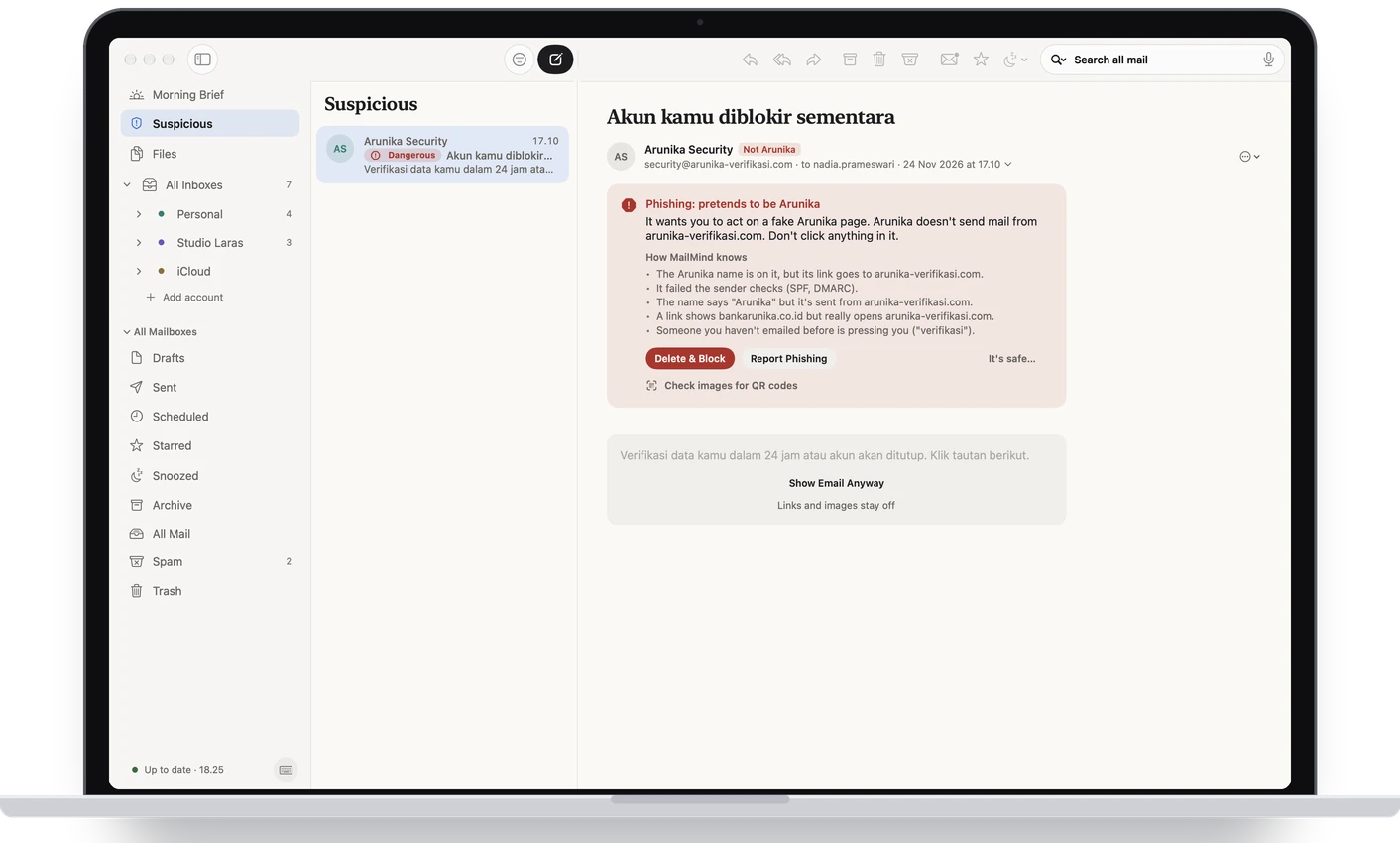
Mail it flags gets a short headline, such as "Phishing: pretends to be BCA", "Payment details scam", "Phone call scam", "Dangerous attachment" or "This looks suspicious", and moves to the Suspicious mailbox (⌃⌘1 on the Mac). Under the reasons you get three choices:
- Report Phishing moves it to Spam and remembers the link domains, so other mail that links there gets flagged.
- It's safe if MailMind got it wrong.
- Delete & Block to be done with that sender.
If Scam Shield flags real mail by mistake, you can report it. Only the domain and the reasons are sent, never the email, and you can turn reporting off in Settings. Mail from a company with an official trademark certificate is recognized, with its verified logo, when you open it.
Flagged mail never loads images, so it can't tell the sender you opened it. On the Mac, clicking a link in flagged mail shows where it really goes before anything opens. The checks know 77 Indonesian brands, including BCA, BRI, Mandiri, DANA, GoPay and Tokopedia, and the Bahasa words scams use, like "verifikasi" and "diblokir". Everything runs on your device. No MailMind server reads your mail. See our privacy policy, or read how MailMind copies one-time codes and never offers a code from flagged mail.
Frequently asked questions
How do I report a phishing email in Gmail?
Open the email in Gmail on the web, click More (the three dots) next to Reply, and choose Report phishing. That reports it to Google as phishing, not just spam.
Is a Google security alert email real?
Google does send real security alerts, but scammers copy them. Don't use the email's button. Go to myaccount.google.com/notifications yourself and check your recent security activity. If the event isn't listed there, the email was fake.
Can a phishing email come from a real address?
Yes. If someone breaks into a real person's or company's mailbox, the scam comes from their real address and passes the sender checks. A sudden change of bank details or an urgent request is still a warning sign, even from someone you know.
What should I do if I clicked a phishing link?
If you typed a password, change it right away on the real site, and anywhere else you use it. Turn on two-step verification. If you gave card or bank details, call your bank using the number on your card or its official website.
Is MailMind's Scam Shield free?
Yes. Scam Shield is part of the free app on Mac, iPhone and iPad. It checks mail on your device and tells you in plain words why an email looks wrong.
A calm, private mail app for Mac, iPhone and iPad. Your mail stays on your devices, and the AI runs on them too. See what it does.
Get MailMind