How to copy two-factor codes from email fast and keep your inbox clean
On a Mac, iPhone or iPad, Apple's AutoFill can offer a verification code that arrives by email, and its Delete After Use setting clears the email once the code is used. In Gmail, a filter can label or archive code emails so they don't pile up. Whatever you use, never give a code to anyone who calls or messages you asking for it.
Why do code emails pile up?
Every sign-in, password reset and new device sends one. Each email is useless five minutes after it arrives, yet it sits in your inbox for years. Worse, getting the code out of the email usually means opening it, finding the number, selecting it, copying it and switching back. Here's how to cut both problems down.
How do I make AutoFill delete code emails after use?
When a code arrives in Apple's Mail or Messages app, AutoFill can suggest it in the sign-in field, so you don't copy anything. Turn on the cleanup setting and the email or message is deleted once AutoFill has used the code. Apple describes the steps in its Personal Safety User Guide:
| Device | Where to turn it on |
|---|---|
| iPhone or iPad, iOS 18 or later | Settings › General › AutoFill & Passwords. Under Verification Codes, turn on Delete After Use. |
| iPhone or iPad, iOS 17 or earlier | Settings › Passwords › Password Options. Turn on Clean Up Automatically. |
| Mac, macOS 15 or later | System Settings › General › AutoFill & Passwords. Under Verification Codes, turn on Delete After Use. |
| Mac, macOS 13 or 14 | System Settings › Passwords › Password Options. Turn on Clean Up Automatically. |
Two limits to know. It only cleans up codes that AutoFill actually fills in for you. If you type the code by hand, the email stays. And it works with Apple's own Mail and Messages apps, so codes that land in another mail app aren't covered.
How do I stop code emails cluttering Gmail?
Gmail can sort them for you with a filter. Google explains filters in Create rules to filter your emails. The short version:
- In Gmail on the web, click the search options button at the right end of the search box.
- In Subject, enter the words your code emails use, for example
"verification code" OR "security code" OR "sign-in code". - Click Create filter, choose to apply a label such as Codes, and save.
You can also tell the filter to archive them so they skip the inbox. Only do that if you get codes some other way, such as AutoFill or a notification. Otherwise you'll be hunting for the code you're waiting on.
Then, every so often, clear them out in one go. Search label:codes older_than:7d, select all, and delete. Our Gmail search operators cheat sheet has more searches like this one.
How do I keep two-factor codes safe?
A code is the last lock on your account. A few rules cover nearly every scam:
- Never share a code. Your bank, Google and Apple won't call, text or email to ask you for one. Anyone who asks is trying to get into your account.
- A code you didn't ask for is a warning. It can mean someone has your password and is trying to sign in. Change the password for that account.
- Check where you're typing it. Phishing pages copy a real sign-in screen, take your password, then ask for the code too. Type the site's address yourself rather than following a link in an email. Our guide to checking an email's sender shows how to spot a fake.
- Don't leave codes on the clipboard. Anything you copy can be read by other apps and saved by clipboard managers. Copy, paste, move on.
How does MailMind handle one-time codes?
MailMind is a mail app for Mac, iPhone and iPad. On Mac, when an unread email under 30 minutes old contains a sign-in code, a Copy chip with the code on it appears right in the inbox list. Click it and the code is on your clipboard without opening the email. The same chip is in the reader, and the new-mail notification has a Copy Code button.
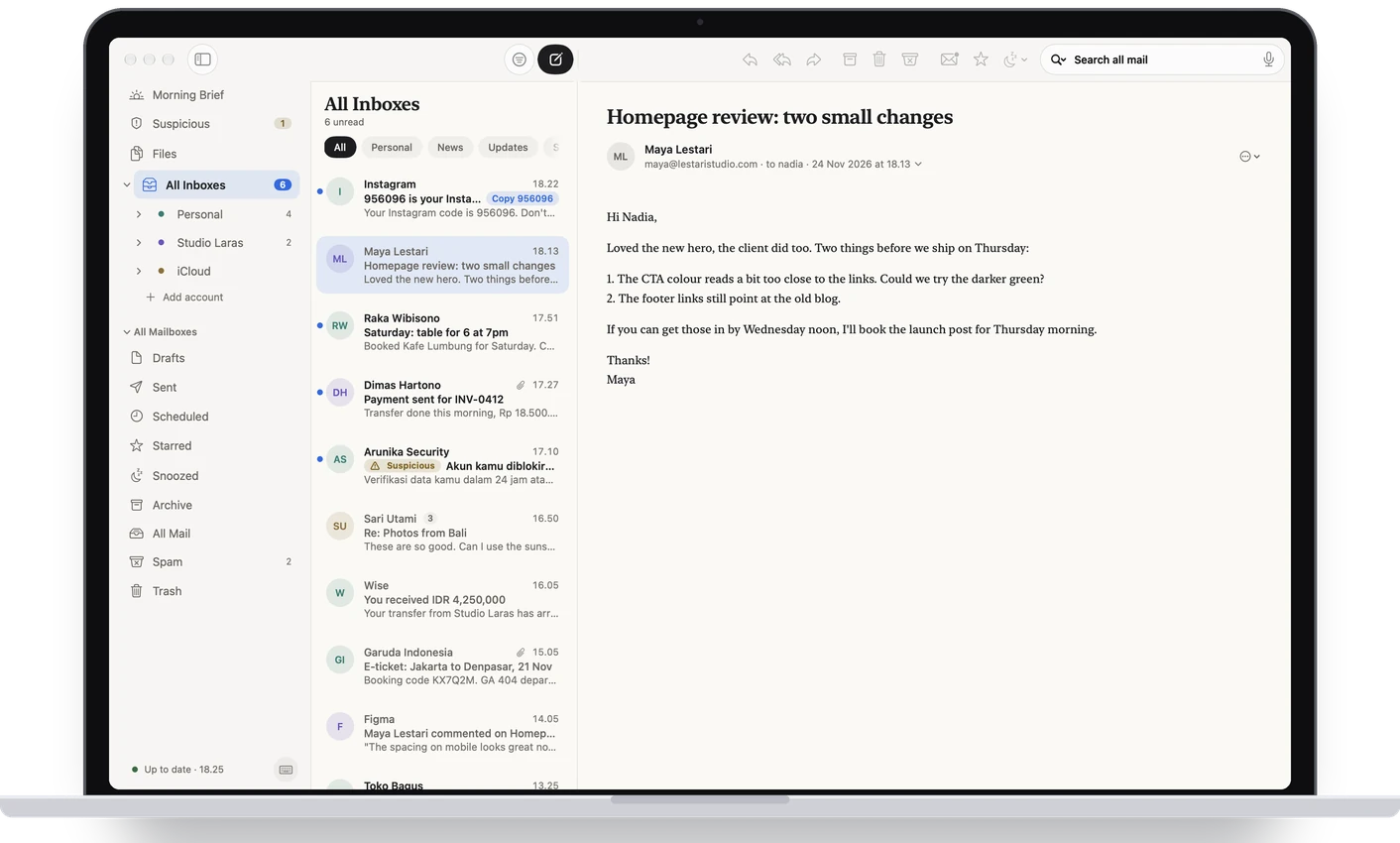
A few safety details are built in:
- The clipboard is cleared after 90 seconds, and the code is marked as concealed so clipboard managers skip it.
- The chip isn't offered on mail MailMind has flagged as suspicious, so a phishing email can't hand you a code to paste into a fake page.
- Zip codes, promo codes and vouchers aren't treated as sign-in codes.
To keep the inbox clean, open Settings › Scam Shield › One-time codes and turn on Delete code emails after copying. It's off by default. When it's on, the email moves to Trash 10 minutes after you copy the code, and you can undo it.
What about iPhone?
On iPhone, open the email and tap Copy code in the reader. To clear them out, turn on Delete Code Emails After Copying in Settings. The notification's Copy Code action is Mac only. For the bigger picture on how MailMind keeps your mail on your devices, see the privacy page.
Frequently asked questions
Can Apple Mail delete verification code emails automatically?
Yes, when AutoFill fills the code in for you. Turn on Delete After Use under Verification Codes in AutoFill & Passwords settings (Clean Up Automatically on older versions). Codes you type by hand aren't cleaned up.
Is it safe to copy a two-factor code to the clipboard?
For a moment, yes. Other apps and clipboard managers can read what you copy, so paste it and move on. MailMind clears the clipboard after 90 seconds and marks the code as concealed so clipboard managers skip it.
Should I ever share a verification code with someone who asks?
No. Banks, Google and Apple don't ask for your codes. Anyone who asks is trying to get into your account.
Does MailMind's Copy code work on iPhone?
Yes. Open the email and tap Copy code in the reader. Turn on Delete Code Emails After Copying in Settings to clear them after you copy. The notification's Copy Code action is Mac only.
A calm, private mail app for Mac, iPhone and iPad. Your mail stays on your devices, and the AI runs on them too. See what it does.
Get MailMind