How to check where an email link really goes
Before you click, look at the real address. On a Mac, hold the pointer over the link and read the address that appears. On iPhone, touch and hold the link instead of tapping it. Then find the domain, the part just before the first single slash, and make sure it's the company you expect. The words in the email don't count. Only the address does.
Why doesn't the link text show where it goes?
In an email, the words you see and the address a link opens are two separate things. A sender can write "bca.co.id" or "Track your package" and point it anywhere. Scammers rely on this. So do honest senders, for less worrying reasons: newsletters wrap every link in a tracking redirect, and company mail filters rewrite links to scan them. Either way, the text on the button tells you nothing.
How do I see a link's real address on a Mac?
In Apple Mail, move the pointer over the link and keep it still for a moment. A small label with the full address appears next to it. Don't click.
In Gmail in Chrome or Safari, hover over the link and look at the bottom left corner of the browser window, where the address shows. Google's own advice in Avoid and report phishing emails is the same: hover first, and if the address doesn't match the description of the link, it might lead to a phishing site.
If you want to read the address calmly, right-click the link, choose Copy Link, and paste it into Notes or TextEdit.
How do I check a link on iPhone?
Touch and hold the link. Don't tap it. iOS shows a menu and, in Mail and many other apps, a preview. Depending on your iOS version and settings, the address appears above the menu, or you can choose Copy Link and paste it into Notes to read it. Be careful with the preview: it can load the page, and tapping it opens the site. For a link you really don't trust, copy it and look at the text instead.
How do I read a web address?
Look for the domain: the name just before the first single slash after https://. Read it from right to left. In https://login.bca.co.id/account, the domain is bca.co.id. In https://bca.co.id.secure-login.com/account, the domain is secure-login.com, and everything before it is decoration the scammer chose.
A few tricks show up again and again:
- Look-alike letters. Some letters from other alphabets look exactly like Latin ones. A Cyrillic "а" passes for an "a". Browsers sometimes show such a domain in its encoded form, which starts with
xn--. If you see that where you expected a familiar brand, stop. - Swapped or extra characters. "rn" looks like "m", a zero looks like an "o", and an extra word such as "-verifikasi" or "-support" turns a real brand into someone else's domain.
- An @ in the address. In
https://bca.co.id@example.com, everything before the @ is ignored and the link opens example.com. - URL shorteners. Links like bit.ly hide the destination entirely. Treat a shortened link in an unexpected email as unknown until you've seen where it leads.
What about long redirect links from Google or Outlook?
Many links you see are wrappers. Gmail sometimes opens links through an address starting with google.com/url?q=. Microsoft's Safe Links, used by many work Outlook accounts, rewrites links to safelinks.protection.outlook.com. Newsletter services do the same with their own domains to count clicks.
The real destination is inside the wrapper, usually after q= or url=. It's often encoded, so %3A%2F%2F stands for ://. Read that inner address the same way. A wrapper from a company you know doesn't make the destination safe. It only means the click passes through that company first.
What should I do after clicking a suspicious link?
If a link opened a sign-in page, don't type your password there. Close the tab. Then open the company's app or type its address yourself, and sign in from there. If they really need something from you, it'll be waiting. If you already entered a password, change it right away on the real site, and turn on two-step verification. If it was a bank, call the number on your card.
For the other signs that give a fake away, see how to tell if an email is phishing. To check whether the sender is real, our guide to SPF, DKIM and DMARC explains the checks your mail server already runs.
How does MailMind check links?
MailMind is the private Mac, iPhone and iPad mail app we make, and it's coming to the App Store. Link checks are part of Scam Shield, which is free.
On Mac, every link asks before it opens. Click any link and MailMind shows "Open" with the host name, the full address, and an Open in Browser button. You read the real destination before anything loads. The address it shows is already cleaned: Google redirects, Outlook Safe Links and Facebook redirects are unwrapped, and tracking tags such as utm_, fbclid and gclid are stripped. That happens on your Mac, without a network call.
When something's off, the dialog says so plainly. A link whose host uses look-alike letters gets "This link uses look-alike letters". A link that hides its real host behind an @ gets "This link is disguised" and tells you the host it really opens. In mail Scam Shield has flagged, the dialog names the brand it imitates ("This link goes to a fake BCA page", for example) or the domain it goes to, with Copy Address and Open Anyway… buttons.
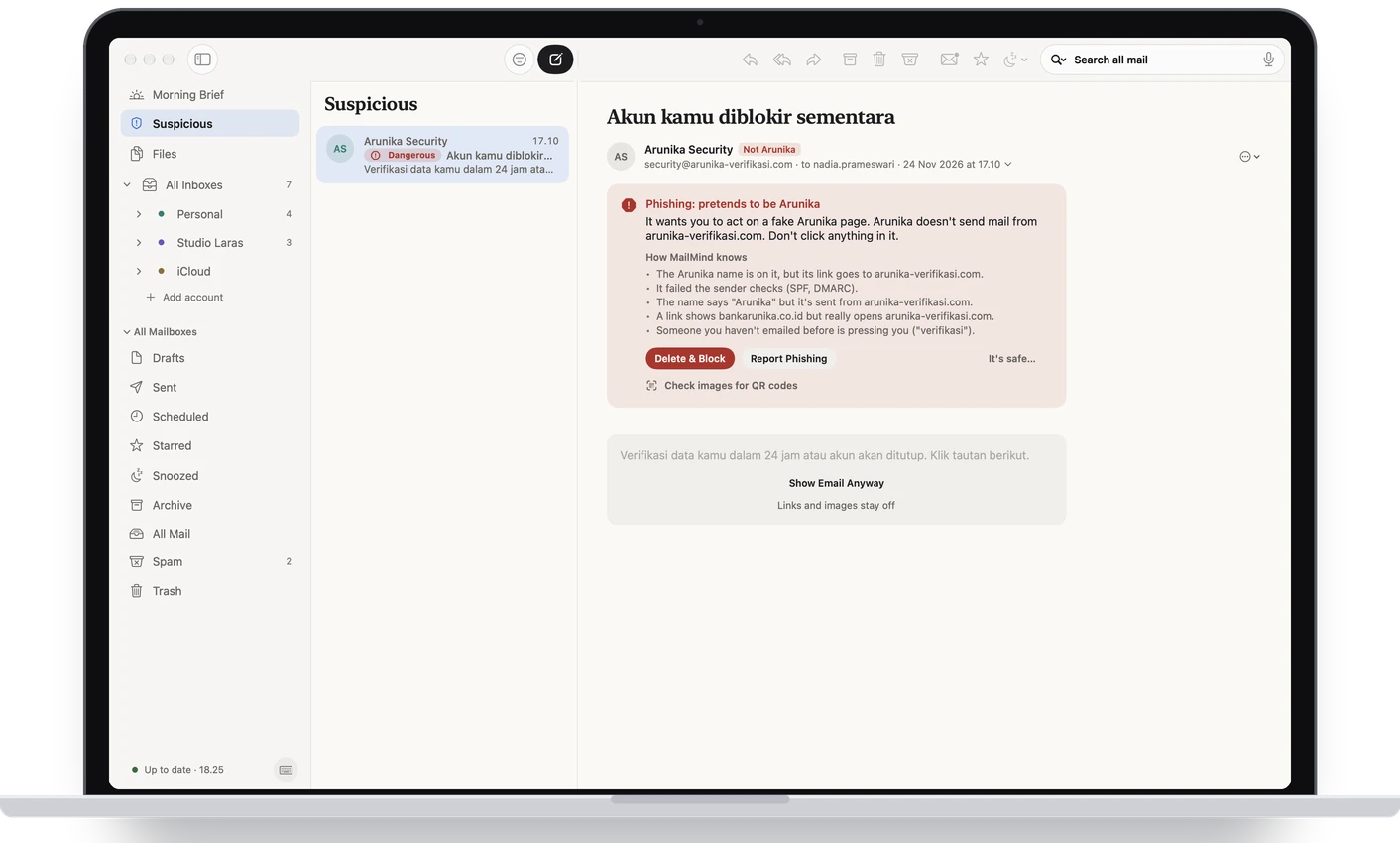
The email itself carries the reasons, too. Scam Shield lists things like "A link shows X but really opens Y." or "A link hides where it goes," so you know what's wrong before you go near a link.
On iPhone it's simpler. Links in ordinary mail open directly. Links in mail Scam Shield finds suspicious ask first, with the host name and Open Link or Cancel. In mail it judges dangerous, links are turned off. The iPhone doesn't have the look-alike dialog or Copy Address yet.
Frequently asked questions
How can I see where a link goes without clicking it?
On a Mac, hold the pointer over the link and read the address that appears. On iPhone, touch and hold the link instead of tapping, then read the address or copy it and paste it into Notes.
Which part of a web address shows who owns it?
The domain: the name just before the first single slash after https://. Read it from right to left. In bca.co.id.secure-login.com, the site belongs to secure-login.com.
Is it safe to long-press a link on iPhone?
Touching and holding doesn't open the link, but the preview it shows can load the page, and tapping the preview opens the site. For a link you don't trust, choose Copy Link and read it in Notes.
What is a safelinks.protection.outlook.com link?
It's Microsoft Safe Links, which many work Outlook accounts use to rewrite and scan links. The real destination sits inside the address, after url=, and you should check that one.
What should I do if I typed my password after clicking a link?
Change that password right away on the real site, typed in yourself, and turn on two-step verification. If the same password is used anywhere else, change it there too.
A calm, private mail app for Mac, iPhone and iPad. Your mail stays on your devices, and the AI runs on them too. See what it does.
Get MailMind